Example group SAML and SCIM configurations
- Tier: Premium, Ultimate
- Offering: GitLab.com
These are notes and screenshots regarding Group SAML and SCIM that the GitLab Support Team sometimes uses while troubleshooting, but which do not fit into the official documentation. GitLab is making this public, so that anyone can make use of the Support team's collected knowledge.
Refer to the GitLab Group SAML documentation for information on the feature and how to set it up.
When troubleshooting a SAML configuration, GitLab team members will frequently start with the SAML troubleshooting section.
They may then set up a test configuration of the desired identity provider. We include example screenshots in this section.
SAML and SCIM screenshots
This section includes relevant screenshots of the following example configurations of Group SAML and Group SCIM:
Warning
These screenshots are updated only as needed by GitLab Support. They are not official documentation.
If you are currently having an issue with GitLab, you may want to check your support options.
Azure Active Directory
This section has screenshots for the elements of Azure Active Directory configuration.
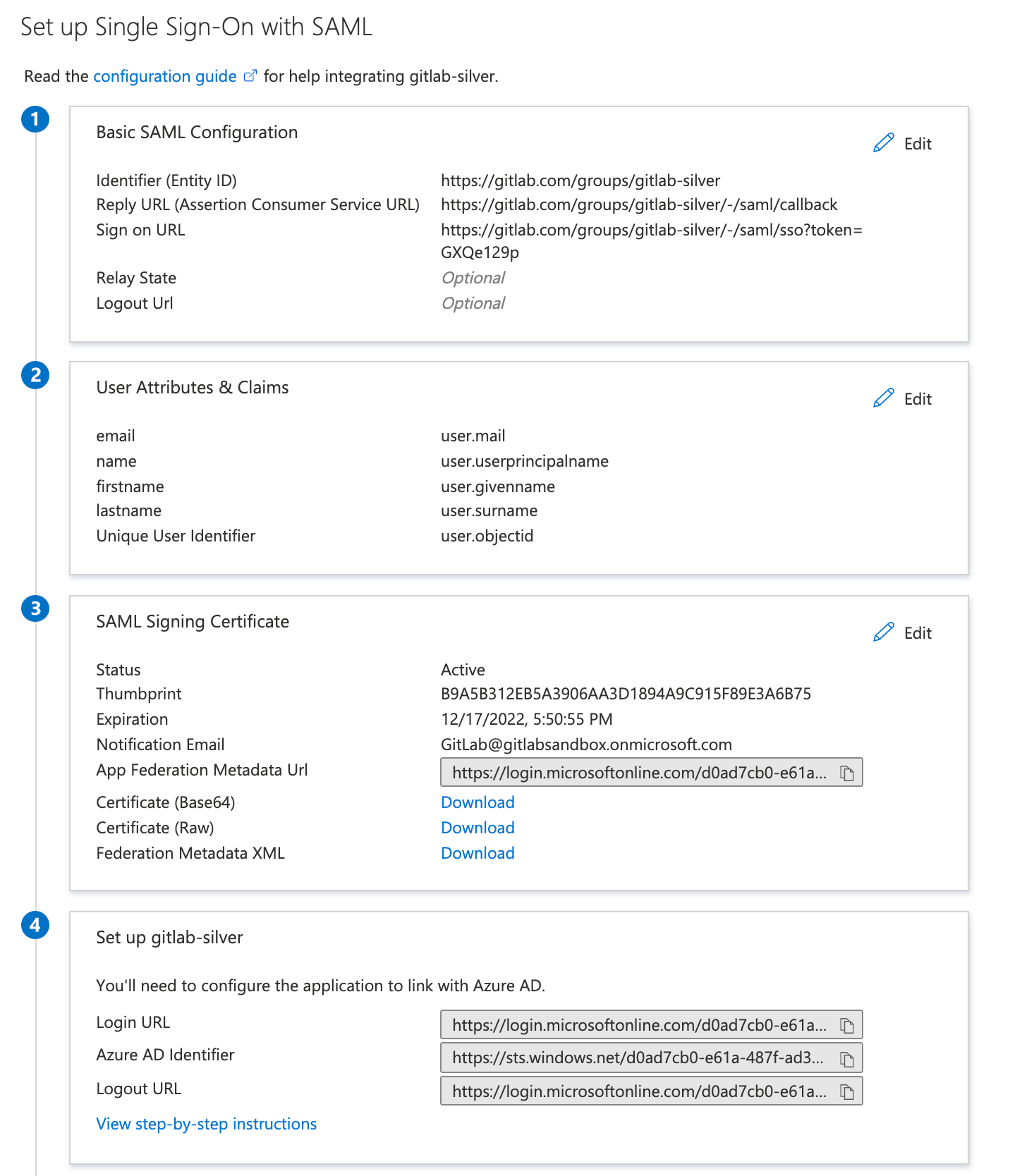
Basic SAML app configuration
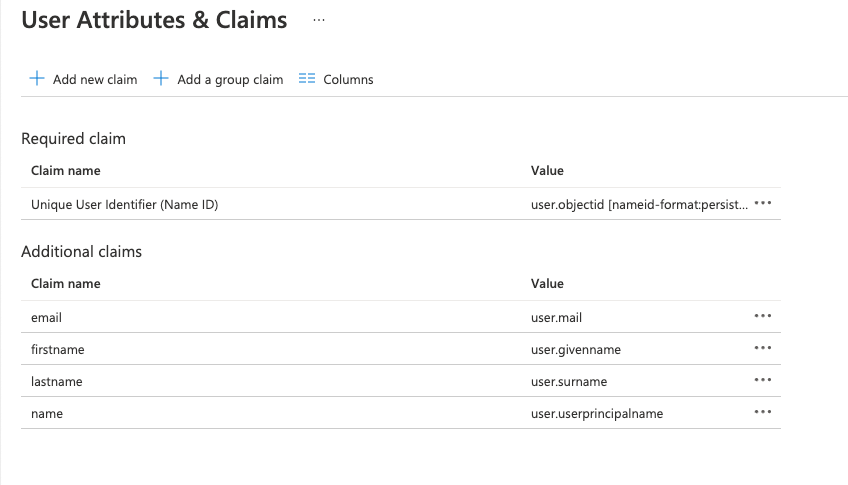
User claims and attributes
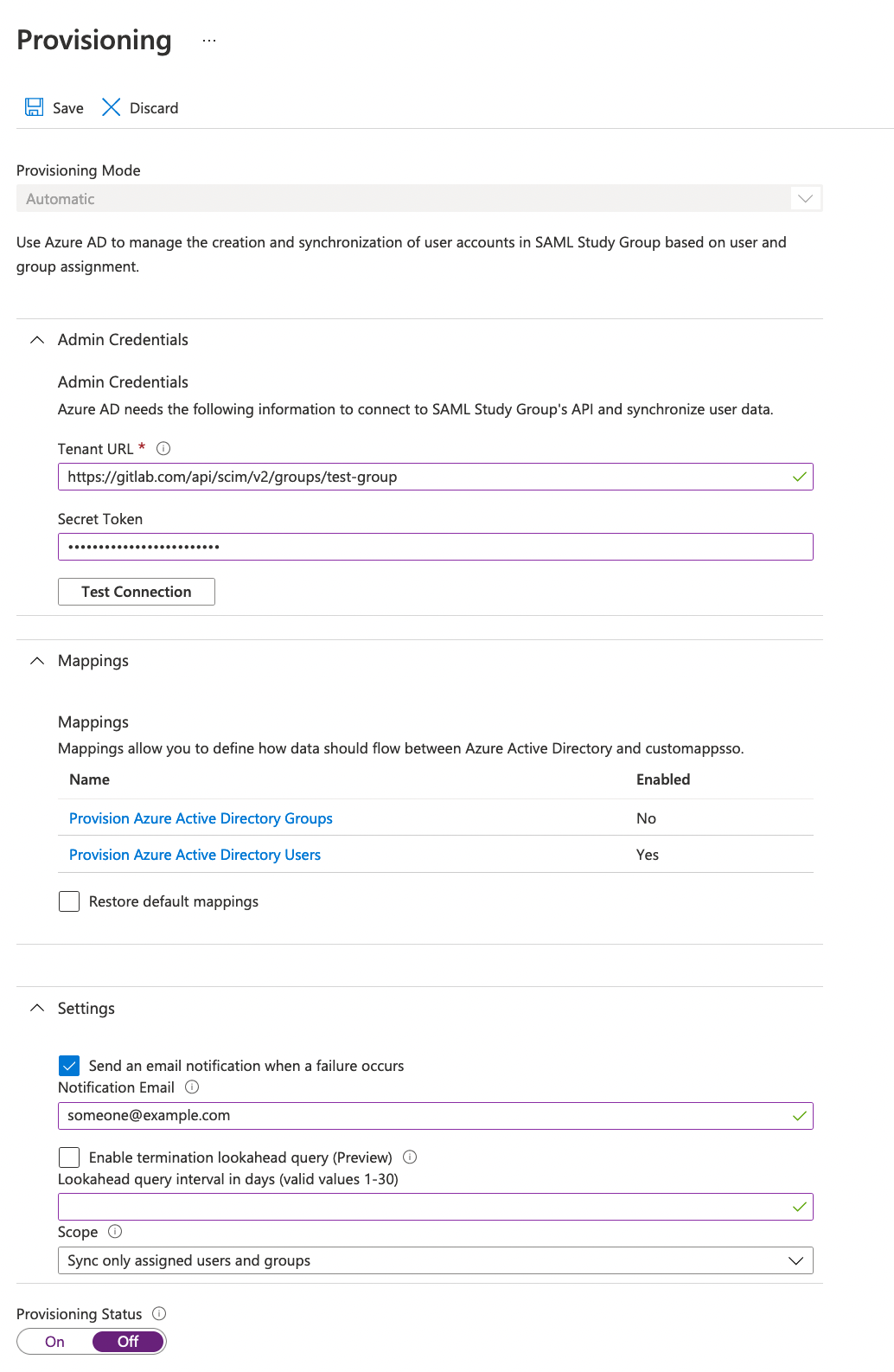
SCIM mapping
Provisioning:
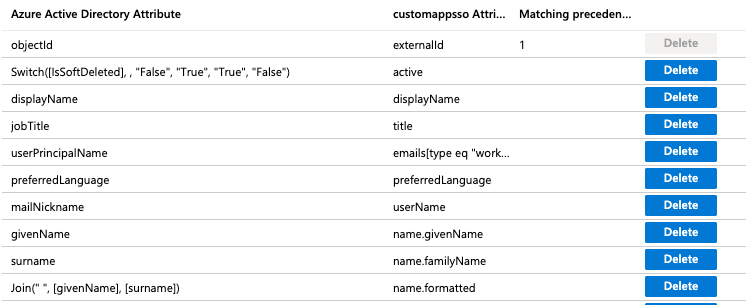
Attribute mapping
Group Sync
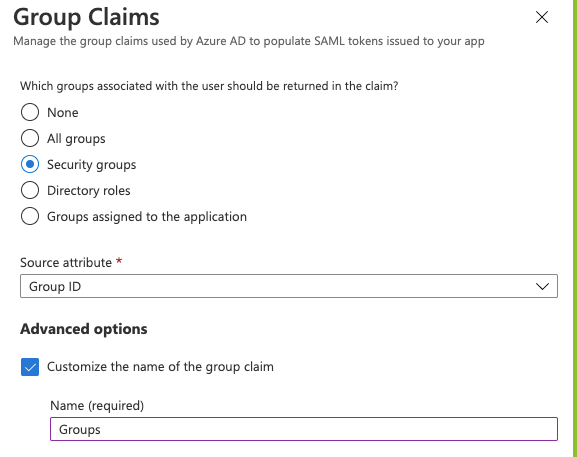
Using the Group ID source attribute requires users to enter the group ID or object ID when configuring SAML group links.
If available, you can add user-friendly group names instead. When setting up Azure group claims:
- Select the sAMAccountName source attribute.
- Enter a group name. You can specify a name up to 256 characters long.
- To ensure the attribute is part of the assertion, select Emit group names for cloud-only groups.
Azure AD limits the number of groups that can be sent in a SAML response to 150. If a user is a member of more than 150 groups, Azure does not include that user's group claim in the SAML response.
Google Workspace
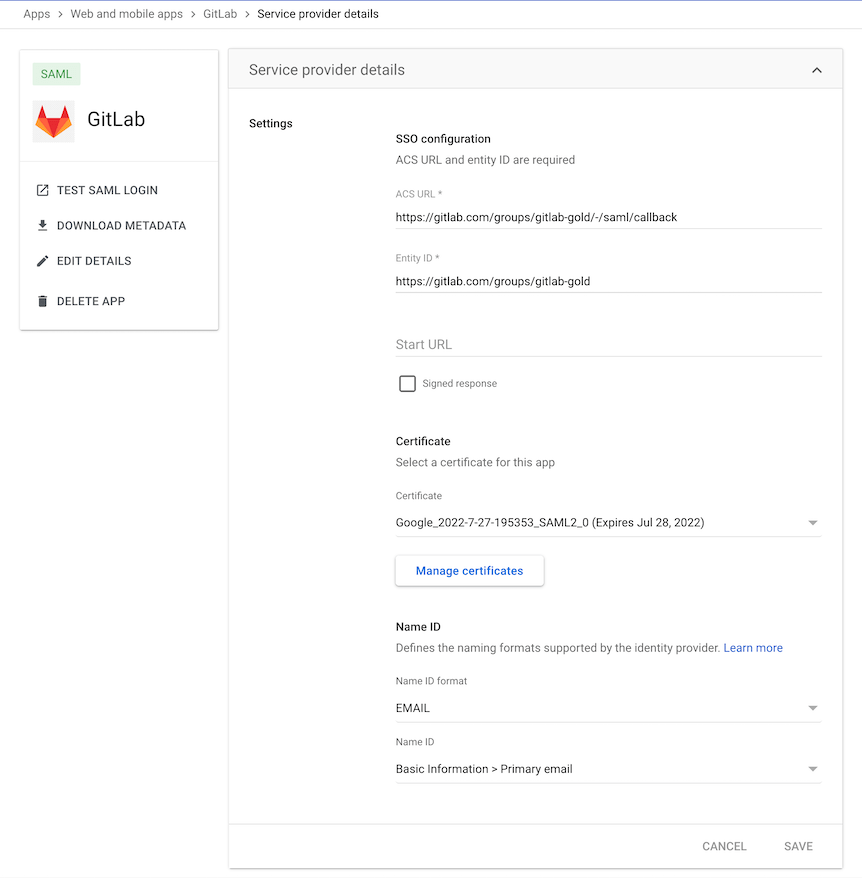
Basic SAML app configuration
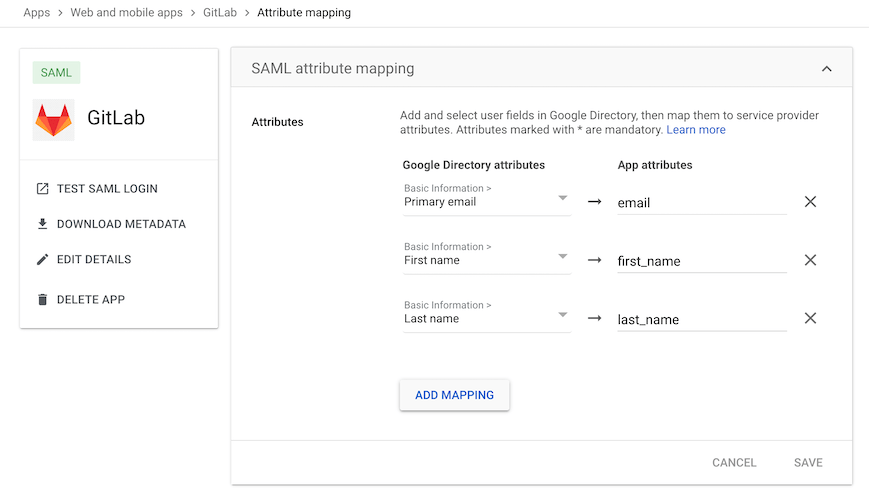
User claims and attributes
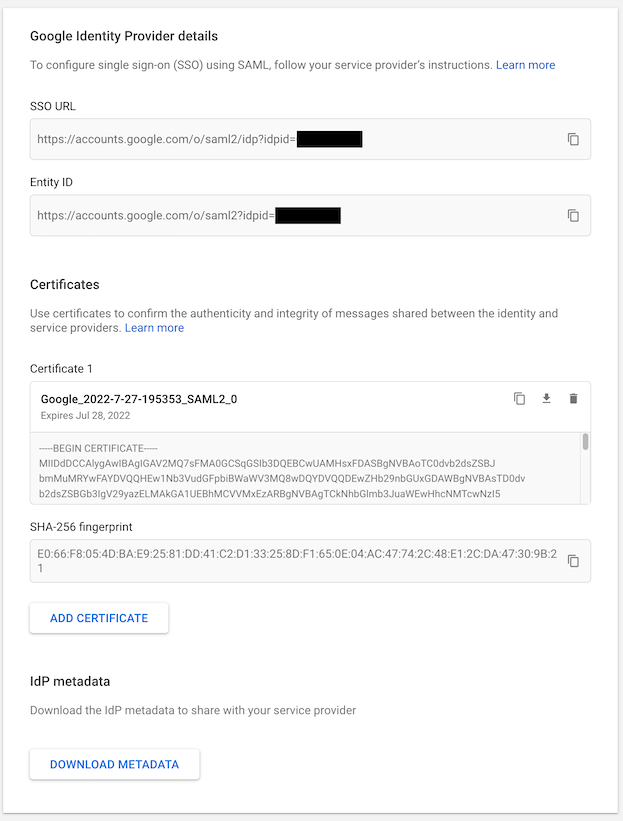
IdP links and certificate
Okta
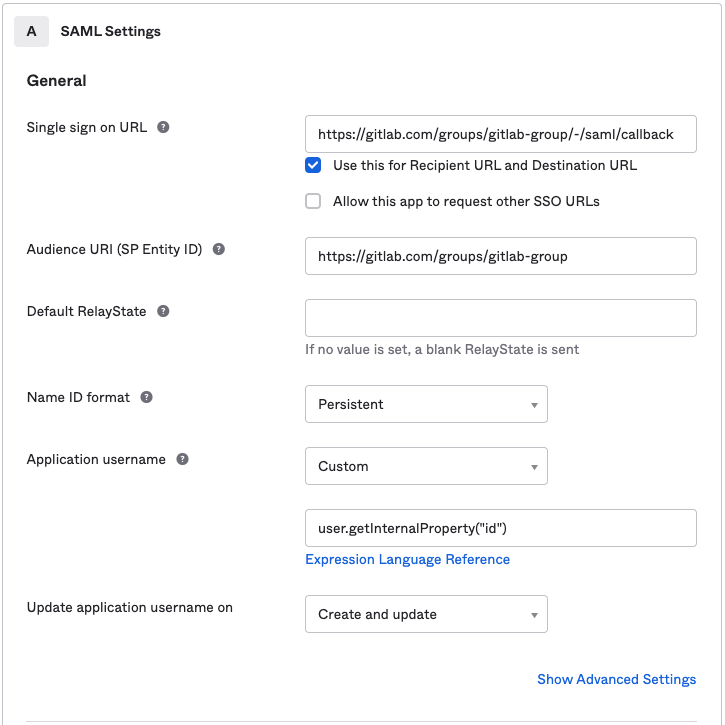
Basic SAML app configuration for GitLab.com groups
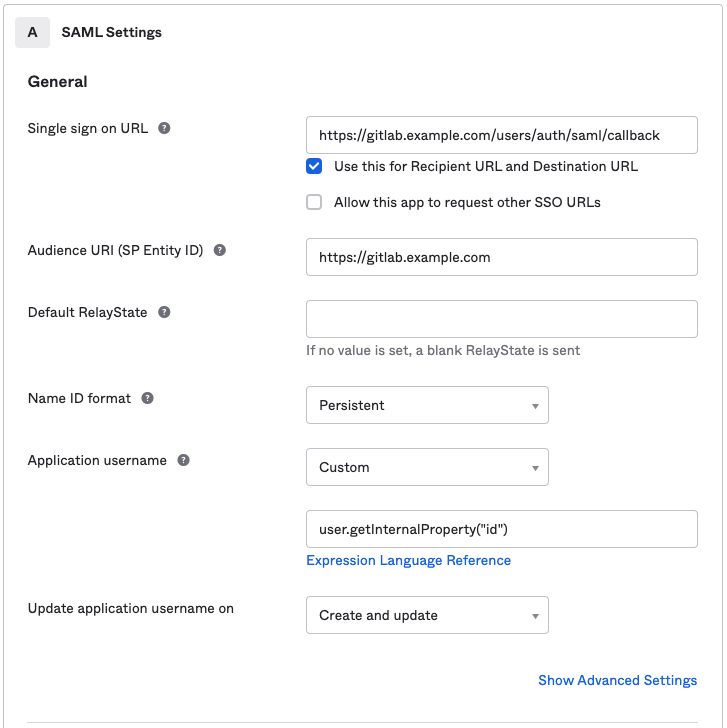
Basic SAML app configuration for GitLab Self-Managed
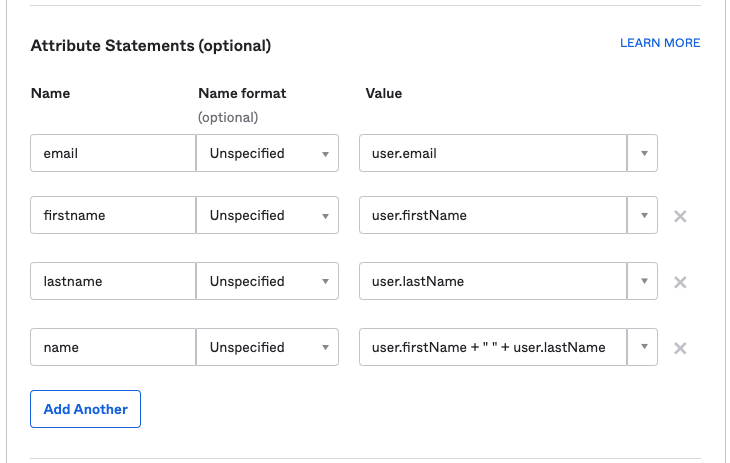
User claims and attributes
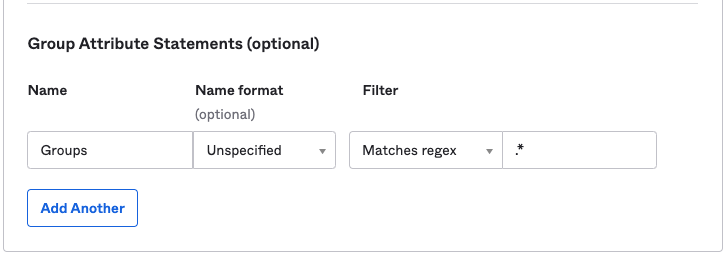
Group Sync
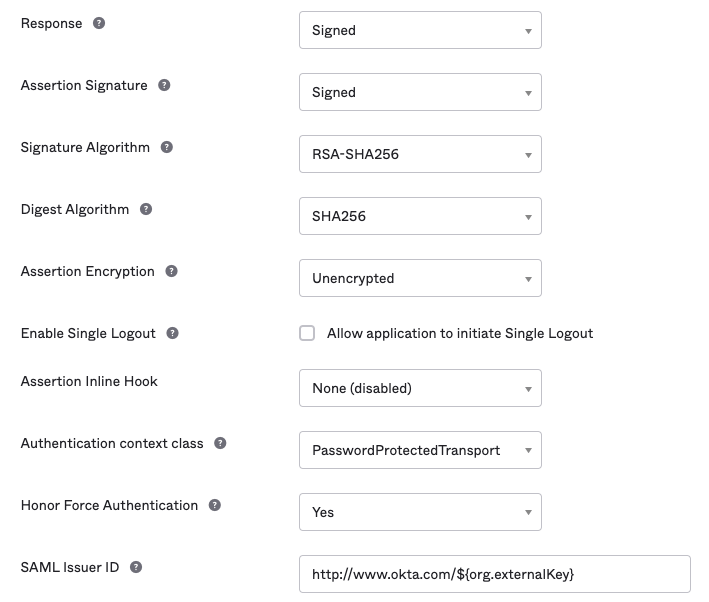
Advanced SAML app settings (defaults)
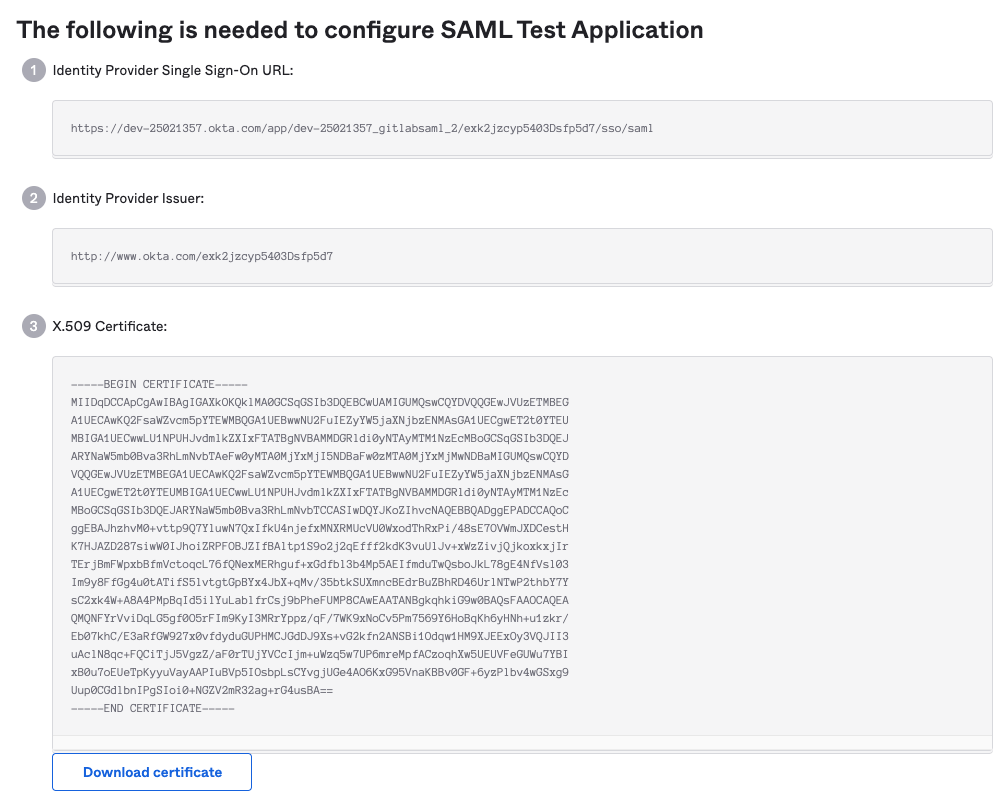
IdP links and certificate
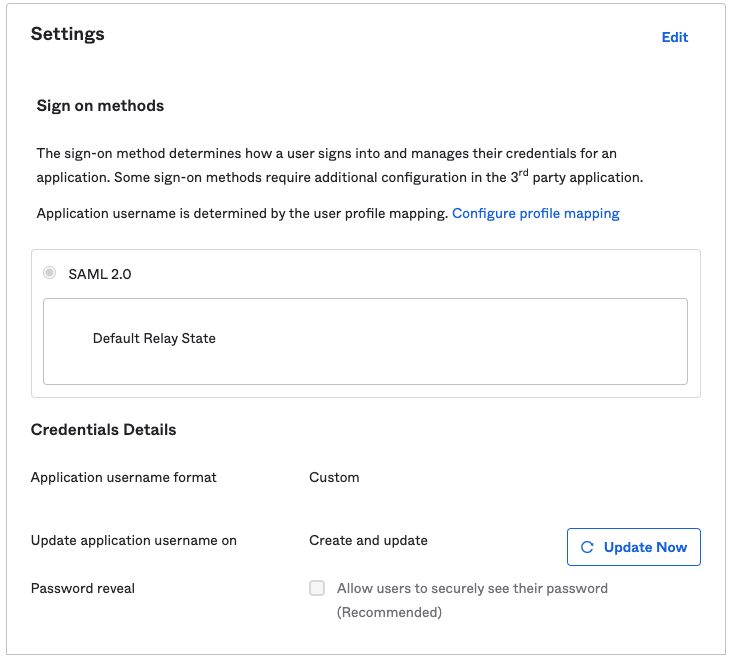
SAML sign on settings
SCIM settings
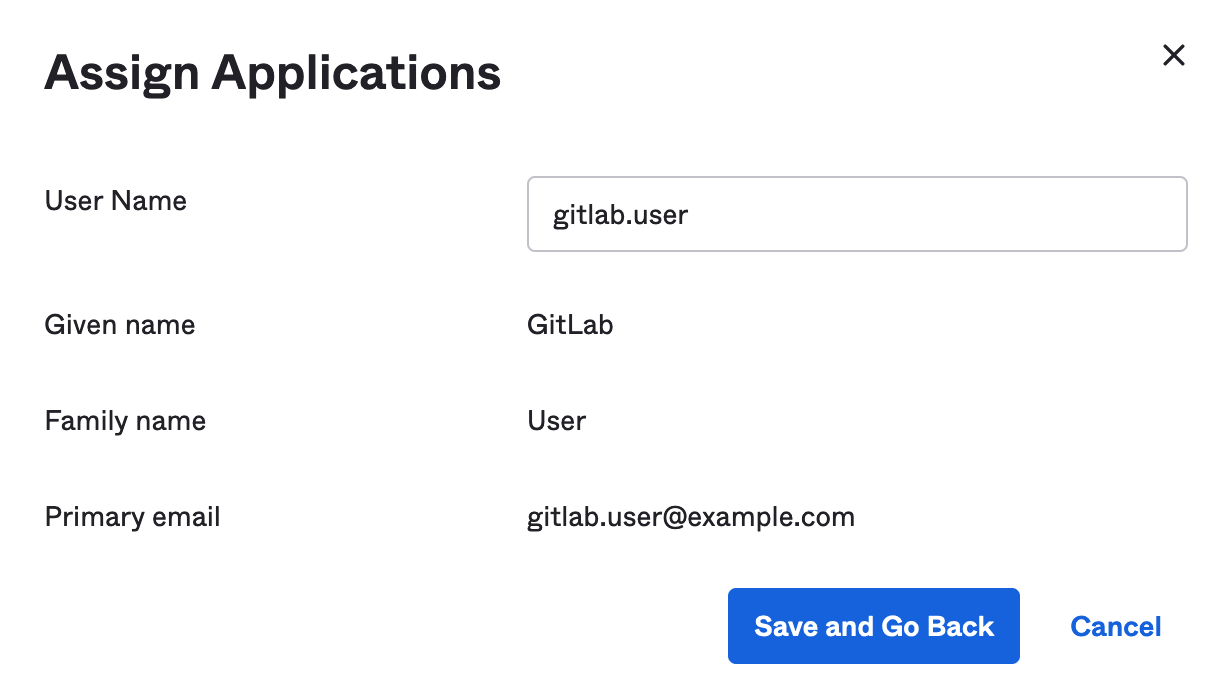
Setting the username for the newly provisioned users when assigning them the SCIM app:
OneLogin
Basic SAML app configuration
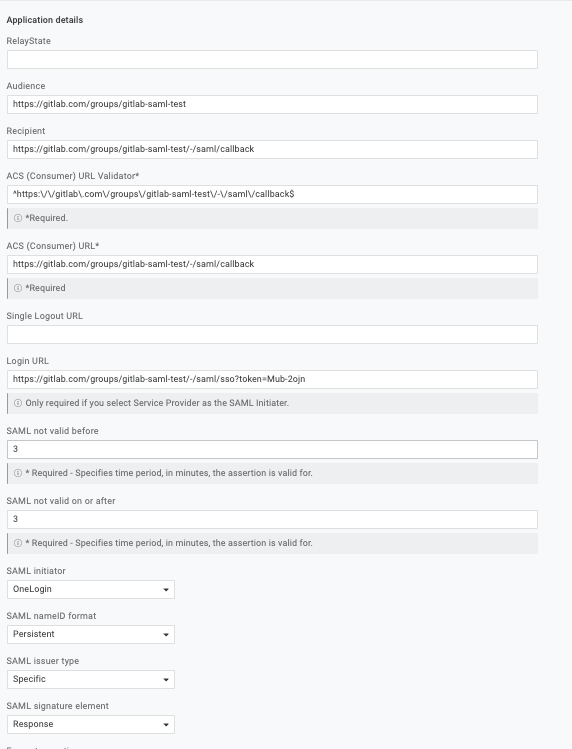
Parameters

Adding a user

SSO settings
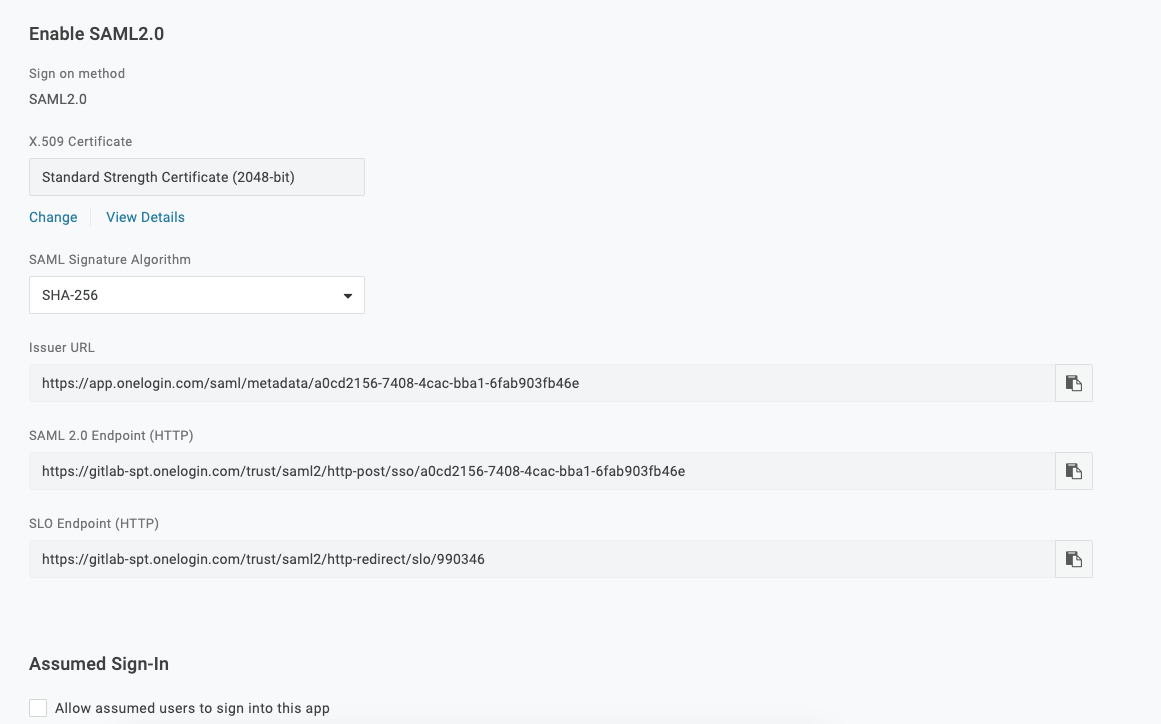
AWS IAM Identity Center
Configure AWS IAM Identity Center with the values in the following tables. For the full setup instructions, see AWS IAM Identity Center.
Application properties
When setting up your own SAML 2.0 application in AWS IAM Identity Center, configure the following application properties:
| AWS Identity Center field | Value |
|---|---|
| Application ACS URL | Your group's Assertion consumer service URL (from GitLab SAML SSO settings) |
| Application SAML audience | Your group's Identifier (from GitLab SAML SSO settings) |
| Application start URL | Your group's GitLab single sign-on URL (from GitLab SAML SSO settings) |
Set the Application start URL for SP-initiated login. Without it, existing users cannot link their accounts.
Attribute mappings
| Attribute | Value | Format |
|---|---|---|
| Subject | ${user:email} |
unspecified |
${user:email} |
unspecified |
|
| first_name | ${user:givenName} |
unspecified |
| last_name | ${user:familyName} |
unspecified |
Warning
You must set the Subject (NameID) format to unspecified. If you set the format to
persistent or transient, existing GitLab users receive a 403 error when they attempt
to link their accounts through SAML. This error only occurs during account linking and does
not affect new users provisioned through AWS IAM Identity Center.
GitLab SAML SSO settings
| GitLab field | Value |
|---|---|
| Identity provider single sign-on URL | IAM Identity Center sign-in URL (from the application's IAM Identity Center SAML metadata section) |
| Certificate fingerprint | SHA1 fingerprint of the certificate downloaded from AWS Identity Center |
SAML response example
When a user signs in using SAML, GitLab receives a SAML response. The SAML response can be found in production.log logs as a base64-encoded message. Locate the response by
searching for SAMLResponse. The decoded SAML response is in XML format. For example:
<?xml version="1.0" encoding="UTF-8"?>
<saml2p:Response xmlns:saml2p="urn:oasis:names:tc:SAML:2.0:protocol" xmlns:xs="http://www.w3.org/2001/XMLSchema" Destination="https://gitlabexample/-/saml/callback" ID="id4898983630840142426821432" InResponseTo="_c65e4c88-9425-4472-b42c-37f4186ac0ee" IssueInstant="2022-05-30T21:30:35.696Z" Version="2.0">
 <saml2:Issuer xmlns:saml2="urn:oasis:names:tc:SAML:2.0:assertion" Format="urn:oasis:names:tc:SAML:2.0:nameid-format:entity">http://www.okta.com/exk2y6j57o1Pdr2lI8qh7</saml2:Issuer>
 <ds:Signature xmlns:ds="http://www.w3.org/2000/09/xmldsig#">
   <ds:SignedInfo>
     <ds:CanonicalizationMethod Algorithm="http://www.w3.org/2001/10/xml-exc-c14n#"/>
     <ds:SignatureMethod Algorithm="http://www.w3.org/2001/04/xmldsig-more#rsa-sha256"/>
     <ds:Reference URI="#id4898983630840142426821432">
       <ds:Transforms>
         <ds:Transform Algorithm="http://www.w3.org/2000/09/xmldsig#enveloped-signature"/>
         <ds:Transform Algorithm="http://www.w3.org/2001/10/xml-exc-c14n#">
           <ec:InclusiveNamespaces xmlns:ec="http://www.w3.org/2001/10/xml-exc-c14n#" PrefixList="xs"/>
         </ds:Transform>
       </ds:Transforms>
       <ds:DigestMethod Algorithm="http://www.w3.org/2001/04/xmlenc#sha256"/>
       <ds:DigestValue>neiQvv9d3OgS4GZW8Nptp4JhjpKs3GCefibn+vmRgk4=</ds:DigestValue>
     </ds:Reference>
   </ds:SignedInfo>
   <ds:SignatureValue>dMsQX8ivi...HMuKGhyLRvabGU6CuPrf7==</ds:SignatureValue>
   <ds:KeyInfo>
     <ds:X509Data>
       <ds:X509Certificate>MIIDq...cptGr3vN9TQ==</ds:X509Certificate>
     </ds:X509Data>
   </ds:KeyInfo>
 </ds:Signature>
 <saml2p:Status xmlns:saml2p="urn:oasis:names:tc:SAML:2.0:protocol">
   <saml2p:StatusCode Value="urn:oasis:names:tc:SAML:2.0:status:Success"/>
 </saml2p:Status>
 <saml2:Assertion xmlns:saml2="urn:oasis:names:tc:SAML:2.0:assertion" xmlns:xs="http://www.w3.org/2001/XMLSchema" ID="id489" IssueInstant="2022-05-30T21:30:35.696Z" Version="2.0">
   <saml2:Issuer xmlns:saml2="urn:oasis:names:tc:SAML:2.0:assertion" Format="urn:oasis:names:tc:SAML:2.0:nameid-format:entity">http://www.okta.com/exk2y6j57o1Pdr2lI8qh7</saml2:Issuer>
   <ds:Signature xmlns:ds="http://www.w3.org/2000/09/xmldsig#">
     <ds:SignedInfo>
       <ds:CanonicalizationMethod Algorithm="http://www.w3.org/2001/10/xml-exc-c14n#"/>
       <ds:SignatureMethod Algorithm="http://www.w3.org/2001/04/xmldsig-more#rsa-sha256"/>
       <ds:Reference URI="#id48989836309833801859473359">
         <ds:Transforms>
           <ds:Transform Algorithm="http://www.w3.org/2000/09/xmldsig#enveloped-signature"/>
           <ds:Transform Algorithm="http://www.w3.org/2001/10/xml-exc-c14n#">
             <ec:InclusiveNamespaces xmlns:ec="http://www.w3.org/2001/10/xml-exc-c14n#" PrefixList="xs"/>
           </ds:Transform>
         </ds:Transforms>
         <ds:DigestMethod Algorithm="http://www.w3.org/2001/04/xmlenc#sha256"/>
         <ds:DigestValue>MaIsoi8hbT9gsi/mNZsz449mUuAcuEWY0q3bc4asOQs=</ds:DigestValue>
       </ds:Reference>
     </ds:SignedInfo>
     <ds:SignatureValue>dMsQX8ivi...HMuKGhyLRvabGU6CuPrf7==</ds:SignatureValue>
     <ds:KeyInfo>
       <ds:X509Data>
         <ds:X509Certificate>MIIDq...cptGr3vN9TQ==</ds:X509Certificate>
       </ds:X509Data>
     </ds:KeyInfo>
   </ds:Signature>
   <saml2:Subject xmlns:saml2="urn:oasis:names:tc:SAML:2.0:assertion">
     <saml2:NameID Format="urn:oasis:names:tc:SAML:2.0:nameid-format:persistent">useremail@domain.com</saml2:NameID>
     <saml2:SubjectConfirmation Method="urn:oasis:names:tc:SAML:2.0:cm:bearer">
       <saml2:SubjectConfirmationData InResponseTo="_c65e4c88-9425-4472-b42c-37f4186ac0ee" NotOnOrAfter="2022-05-30T21:35:35.696Z" Recipient="https://gitlab.example.com/-/saml/callback"/>
     </saml2:SubjectConfirmation>
   </saml2:Subject>
   <saml2:Conditions xmlns:saml2="urn:oasis:names:tc:SAML:2.0:assertion" NotBefore="2022-05-30T21:25:35.696Z" NotOnOrAfter="2022-05-30T21:35:35.696Z">
     <saml2:AudienceRestriction>
       <saml2:Audience>https://gitlab.example.com/</saml2:Audience>
     </saml2:AudienceRestriction>
   </saml2:Conditions>
   <saml2:AuthnStatement xmlns:saml2="urn:oasis:names:tc:SAML:2.0:assertion" AuthnInstant="2022-05-30T21:30:35.696Z" SessionIndex="_c65e4c88-9425-4472-b42c-37f4186ac0ee">
     <saml2:AuthnContext>
       <saml2:AuthnContextClassRef>urn:oasis:names:tc:SAML:2.0:ac:classes:PasswordProtectedTransport</saml2:AuthnContextClassRef>
     </saml2:AuthnContext>
   </saml2:AuthnStatement>
   <saml2:AttributeStatement xmlns:saml2="urn:oasis:names:tc:SAML:2.0:assertion">
     <saml2:Attribute Name="email" NameFormat="urn:oasis:names:tc:SAML:2.0:attrname-format:unspecified">
       <saml2:AttributeValue xmlns:xs="http://www.w3.org/2001/XMLSchema" xmlns:xsi="http://www.w3.org/2001/XMLSchema-instance" xsi:type="xs:string">useremail@domain.com</saml2:AttributeValue>
     </saml2:Attribute>
     <saml2:Attribute Name="firstname" NameFormat="urn:oasis:names:tc:SAML:2.0:attrname-format:unspecified">
       <saml2:AttributeValue xmlns:xs="http://www.w3.org/2001/XMLSchema" xmlns:xsi="http://www.w3.org/2001/XMLSchema-instance" xsi:type="xs:string">John</saml2:AttributeValue>
     </saml2:Attribute>
     <saml2:Attribute Name="lastname" NameFormat="urn:oasis:names:tc:SAML:2.0:attrname-format:unspecified">
       <saml2:AttributeValue xmlns:xs="http://www.w3.org/2001/XMLSchema" xmlns:xsi="http://www.w3.org/2001/XMLSchema-instance" xsi:type="xs:string">Doe</saml2:AttributeValue>
     </saml2:Attribute>
     <saml2:Attribute Name="Groups" NameFormat="urn:oasis:names:tc:SAML:2.0:attrname-format:unspecified">
       <saml2:AttributeValue xmlns:xs="http://www.w3.org/2001/XMLSchema" xmlns:xsi="http://www.w3.org/2001/XMLSchema-instance" xsi:type="xs:string">Super-awesome-group</saml2:AttributeValue>
     </saml2:Attribute>
   </saml2:AttributeStatement>
 </saml2:Assertion>
</saml2p:Response>